Install IPTV Smarters Pro on Android: Complete Guide to a Safe APK Installation
Learn how to install IPTV Smarters Pro on your Android device safely using an APK file. Follow our step-by-step guide for a successful installation.

Outline
Section | Subsection |
|---|---|
1. Introduction | 1.1. Overview of IPTV Smarters Pro and why it matters |
1.2. Why APK installation matters for IPTV Smarters Pro | |
2. What is IPTV Smarters Pro? | 2.1. IPTV Smarters Pro features |
2.2. Why IPTV Smarters Pro is popular | |
3. Understanding APK installation | 3.1. What is an APK file? |
3.2. Why APK installation is needed for IPTV Smarters Pro | |
3.3. Security considerations when installing APK files | |
4. Preparing for the installation | 4.1. Enable "Install from unknown sources" |
4.2. Check device compatibility | |
4.3. Back up existing data | |
5. Step-by-step guide to installing IPTV Smarters Pro | 5.1. Download the APK file from the official website |
5.2. Install the APK file | |
5.3. Fix common installation problems | |
6. Adding IPTV channels | 6.1. Initial app setup |
6.2. Using the Xtream Codes API to add a channel list | |
6.3. Checking and finishing the channel setup | |
7. Benefits of using IPTV Smarters Pro | 7.1. Flexibility and customisation |
7.2. Comparison with other IPTV apps | |
8. Future outlook and emerging trends | 8.1. The evolution of IPTV apps |
8.2. The growing importance of security and privacy | |
9. Conclusion | 9.1. Summary of key points |
9.2. Final tips for optimal use |
Content
1. Introduction
1.1. Overview of IPTV Smarters Pro and why it matters
IPTV Smarters Pro is an app widely used by streaming fans to access IPTV channels. Since the app was removed from the Google Play Store, manual installation via an APK file has become essential. This article guides you through the complete process to ensure a smooth installation on Android devices.
1.2. Why APK installation matters for IPTV Smarters Pro
With the app no longer on the Google Play Store, APK installation remains the only way to get IPTV Smarters Pro. The process is not only simple but also safe when done correctly. We will go through the detailed steps to install the app safely.
2. What is IPTV Smarters Pro?
2.1. IPTV Smarters Pro features
IPTV Smarters Pro is known for its robust features, including support for multiple playlist formats, an intuitive user interface and the ability to customise the viewing experience. Users can access their favourite channels, record shows and even set up subtitles, all in a single app.
2.2. Why IPTV Smarters Pro is popular
IPTV Smarters Pro's popularity rests on its ease of use and its compatibility with a wide range of Android devices. Its user-friendly interface and advanced features also make it a favourite among IPTV users.
3. Understanding APK installation
3.1. What is an APK file?
An APK (Android Package Kit) file is the file format used to distribute and install apps on Android devices. Unlike standard installations from the Play Store, APK installation lets users bypass certain restrictions, giving them more control over the installation process.
3.2. Why APK installation is needed for IPTV Smarters Pro
As IPTV Smarters Pro is no longer available on the Play Store, installing via APK is the alternative way to get the app. This process ensures users can still enjoy IPTV Smarters Pro's features without relying on Google's services.
3.3. Security considerations when installing APK files
APK files must be installed with care. It is essential to download files only from trusted sources to avoid malware. In this article, we use the publisher's official link to guarantee security.
4. Preparing for the installation
4.1. Enable "Install from unknown sources"
Before installing the IPTV Smarters Pro APK file, you will need to enable the "Install from unknown sources" option in your device settings. This lets your device accept installations that do not come from the Play Store.
4.2. Check device compatibility
It is important to check that your device is compatible with the IPTV Smarters Pro app. Most recent Android devices should work without any problem, but a quick check of the specifications can prevent issues.
4.3. Back up existing data
Before installing any external app, it is recommended to back up your data to avoid any unexpected loss. This keeps your information safe if something goes wrong during installation.
5. Step-by-step guide to installing IPTV Smarters Pro
5.1. Download the APK file from the official website
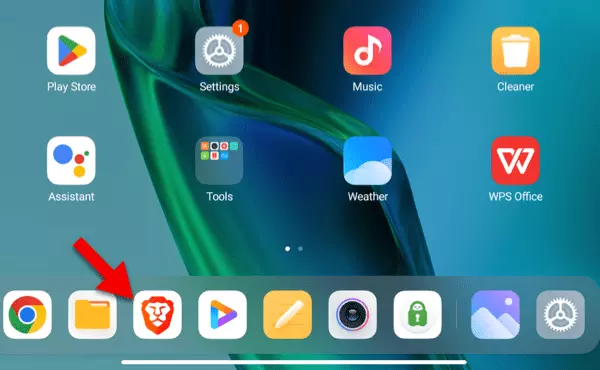
Open your browser and go to the following address: https://www.iptvsmarters.com/smarters.apk. Download the official APK file for IPTV Smarters Pro.
5.2. Install the APK file
Once the file has downloaded, open it to start the installation. If your device asks for permission to install apps from unknown sources, follow the instructions to allow the installation.
5.3. Fix common installation problems
If the installation fails or you see error messages, check your device's security settings and make sure you have enough storage space. Also see our guide for further solutions.
6. Adding IPTV channels
6.1. Initial app setup
After installation, open the IPTV Smarters Pro app. The first time you open it, the app will automatically detect the best settings for your device. Accept the settings and continue.
6.2. Using the Xtream Codes API to add a channel list
To add your IPTV channels, use the Xtream Codes API, one of the simplest ways to enter your streaming line details. You will need to enter a name, your username, your password and your IPTV provider's URL.
6.3. Checking and finishing the channel setup
Once the details are entered, the app will download the channel list from the IPTV server. Check that everything is correct and start enjoying your channels in streaming.
7. Benefits of using IPTV Smarters Pro
7.1. Flexibility and customisation
IPTV Smarters Pro offers exceptional flexibility, letting users customise their viewing experience with different layout options, subtitles and more.
7.2. Comparison with other IPTV apps
Compared with other IPTV apps, IPTV Smarters Pro stands out for its simplicity and rich features, making the user experience more pleasant and intuitive.
8. Future outlook and emerging trends
8.1. The evolution of IPTV apps
IPTV apps keep evolving, with increasingly advanced features to improve the user experience. IPTV Smarters Pro remains at the forefront of these developments.
8.2. The growing importance of security and privacy
With growing security and privacy concerns, users are increasingly careful about where their APK files come from. IPTV Smarters Pro keeps users safe when installed from trusted sources.
9. Conclusion
9.1. Summary of key points
By following the steps provided, you can install IPTV Smarters Pro on your Android device safely. The app lets you make the most of your favourite IPTV channels thanks to its advanced features and user-friendly interface. It is essential to make sure the installation comes from trusted sources to avoid any security risks.
9.2. Final tips for optimal use
For optimal use of IPTV Smarters Pro, keep the app up to date by downloading the latest APK versions from the official website. Also take the time to customise the app to your preferences, whether for playback settings, subtitles or channel organisation. Finally, don't forget to explore the app's various options to get the most out of your streaming experience.